
How to Set Up a Record Player 2026 | Step-by-Step

Vinyl collector for over thirty years. Found my first turntable and a box of records in the loft at twelve — Nashville Skyline, After the Gold Rush, Disraeli Gears. Still spinning on a vintage Sony PS-X600.
Just so you know, some links on this page are affiliate links. If you buy something via them, we get a small kickback. You don't pay more, but it helps toward the next record.
Getting a turntable set up correctly takes 20 to 30 minutes and makes a genuine difference to both sound quality and record longevity. The factory settings on most turntables are adequate but not necessarily optimal. Checking tracking force, anti-skate, and platter levelness at the start prevents months of suboptimal sound, and in the worst cases, accelerated groove wear.
This guide covers setup from unboxing to playing your first record: placement, connections, tracking force, anti-skate, cartridge alignment, and the maintenance routine that keeps everything working.
What You Need for Setup
Most of the setup process uses only what came with the turntable. A few additions help:
A small bubble level checks platter levelness accurately. Your phone's level app works too, though accuracy varies. Place it on the platter with the record removed.
A digital stylus gauge measures tracking force precisely. Far more accurate than setting by the numbered dial alone. Essential for the AT-LP120X; less important for the AT-LP60X which has a pre-set tracking force.
A cartridge alignment protractor (usually included with the turntable, or downloadable and printable free from The Vinyl Factory or similar sites) is used for cartridges in removable headshells. Only relevant for turntables like the AT-LP120X.
A carbon fiber record brush and stylus brush complete the setup. These are for ongoing maintenance rather than initial setup, but you'll want them from the first session.
Step 1: Placement
Your turntable needs a stable, level surface. Every vibration that reaches the platter or tonearm during playback becomes noise in the signal. The stylus tracks in a groove 0.001 inches wide under 1.5 to 3 grams of force, it picks up everything.
Surface requirements. The surface must not move when you apply light pressure. A solid wooden shelf, a dedicated hi-fi stand, or a heavy piece of furniture all work. Light flat-pack furniture with thin panels resonates with bass frequencies from nearby speakers. If your shelf wobbles when you press it firmly, find a better surface for the turntable.
Isolation. Turntables respond to vibration from the room, bass from speakers, footfall, air conditioning. Purpose-built isolation platforms or isolation feet (sorbothane feet are affordable and effective at around $15 to $20) reduce the vibration coupling between the turntable and the surface. Not essential at entry level, but worth adding if you notice skipping at moderate volumes.
Separation from speakers. Bass frequencies travel through furniture and into the turntable. A good rule: different furniture is better than the same shelf. If turntable and speakers must share a surface, add isolation material between the turntable and the surface and try to keep at least a foot of distance between turntable and speakers.
Traffic paths. A turntable on a flimsy shelf near a frequently-used doorway or hallway will skip when people walk past. If your apartment or house has bouncy floors, a wall-mounted shelf isolates the turntable from floor vibration entirely. Not necessary in most homes, but worth knowing.
Step 2: Leveling the Platter
A level platter ensures equal tracking force on both groove walls as the stylus tracks across the record. If the platter tilts, the stylus applies more force on one side, causing uneven wear and degraded stereo separation over time.
Place a bubble level on the platter with the record removed. Most small torpedo levels work. Check both front-to-back and side-to-side, both axes matter. Adjust the turntable's feet (most turntables have at least two or four adjustable rubber feet) until the bubble centers in both orientations.
If the underlying furniture is uneven, shim the turntable's feet with a thin piece of rubber or folded card until level. The platter should be horizontal, not the turntable body.
Step 3: Connecting to Speakers
The LINE/PHONO switch. The AT-LP60X, AT-LP120X, and most modern turntables with built-in phono preamps have a LINE/PHONO switch on the back. Set to LINE for connection to powered speakers, a stereo receiver's AUX input, or any standard line-level input. Set to PHONO only when connecting to a receiver or amplifier with a dedicated PHONO input that has its own phono stage.
Using the turntable's internal preamp (LINE) and the receiver's phono stage simultaneously amplifies the signal twice, causing severe distortion. Use one or the other.
RCA cable connection. The included RCA cable (red and white) connects turntable to speakers or amplifier. Red to red, white to white. If there is a bare ground wire or spade connector at the turntable end, connect it to the GROUND terminal on your receiver or speakers, this eliminates hum. Not all setups need the ground connected; connect it if you hear a hum.
Testing before playing. Before putting a record on, verify the connection is working: confirm everything is plugged in, the LINE/PHONO switch is set correctly, and the turntable is powered. Turn the volume up and listen, if you hear a hum, check the ground wire. If you hear silence, you're ready.
Step 4: Setting Tracking Force
Tracking force is the downward pressure of the stylus against the groove. Too light: the stylus skips, loses contact with the groove, and can bounce in ways that damage both stylus and groove. Too heavy: unnecessary groove wear and accelerated stylus wear.
Every cartridge specifies a recommended tracking force range. For the AT-LP60X, this is pre-set at the factory at approximately 3.5 grams and is not user-adjustable. For the AT-LP120X, the recommended range for the stock AT-VM95E cartridge is 1.8 to 2.2 grams, with 2.0 grams recommended.
Setting tracking force on the AT-LP120X:
1. Set the anti-skate dial to zero. 2. Remove the stylus guard carefully. 3. Hold the tonearm at playing height, then adjust the counterweight (the weight at the rear of the tonearm) until the tonearm floats level in the air, neither lifting nor falling, balanced. 4. Without moving the counterweight body, rotate only the numbered ring on the counterweight face until the zero aligns with the reference mark on the tonearm. 5. Now turn the entire counterweight assembly, body and ring together, toward you (increasing weight) until the number matching your target tracking force aligns with the reference mark.
Confirm with a digital stylus gauge placed on the platter at record height. Lower the stylus onto the gauge and read the result. Adjust the counterweight until you're within 0.1 grams of target.
Step 5: Anti-Skate
As the tonearm tracks from the outer edge toward the spindle, a lateral force pulls the tonearm inward. This is skating force, caused by the friction between stylus and groove combined with the offset angle of the tonearm. Without compensation, the stylus presses harder against the inner groove wall than the outer, causing uneven wear and left-channel emphasis.
Anti-skate applies a counteracting outward force. The standard starting point: set anti-skate equal to your tracking force value. If tracking force is 2 grams, set anti-skate to 2.
This is a starting point. If you hear distortion in the left channel (inner wall) before the right, increase anti-skate slightly. If you hear it in the right channel first, decrease it.
Step 6: Cartridge Alignment
For turntables with removable headshells, the AT-LP120X and similar, cartridge alignment ensures the stylus traces the correct arc across the record, minimizing tracking error at any groove radius.
Most turntables include an alignment protractor. The common alignment standards in North America are Baerwald and Stevenson, both are two-point protractors with null points where tracking error is zero.
To align: 1. Place the protractor on the spindle. 2. Position the headshell so the stylus tip rests on the first null point. 3. Adjust the cartridge body within the headshell slot until it is parallel to the alignment lines on the protractor. 4. Verify alignment at the second null point. 5. Tighten the headshell screws when correct. A small Phillips screwdriver works.
Fixed-headshell turntables (AT-LP60X) are factory-aligned. No action needed.
Step 7: Stylus Break-In
New styli improve slightly over the first 20 to 30 hours of play as the cantilever suspension settles and microscopic imperfections on the stylus tip smooth out. The improvement is real but not dramatic. Play records normally, no special break-in records required.
When to replace. Styli wear. Budget styli last approximately 300 to 500 hours. Quality styli last 800 to 1000 hours or more. Warning signs: the sound becomes thin and sibilant, you lose stereo separation, and high-frequency content distorts. Under a 30x loupe or smartphone macro lens, a worn stylus shows visible flat spots or asymmetric wear.
Keep a rough record of playing time. A record a day, roughly 30 minutes per side, is approximately 180 hours per year. Most entry-level styli reach end of life around year two or three at this rate.
When replacing, use only styli designed for your specific cartridge model. For the AT-LP60X: AT-VM95 series styli. For the AT-LP120X: AT-VM95 series. LPGear.com has an excellent compatibility tool and carries styli for hundreds of cartridge models. The Audio-Technica website sells genuine replacements directly.
Ongoing Maintenance
Before every session. One stroke front-to-back with the stylus brush on the stylus. One pass of the carbon fiber brush on the record (two rotations, then draw off the edge). Ten seconds total. This prevents most playback problems.
Every 100 hours of play. Check tracking force with the digital stylus gauge. Stylus suspension compliance changes gradually; tracking force can drift. Recalibrate if it has moved more than 0.2 grams from spec.
Every 300 to 500 hours. Assess stylus condition. Budget styli in this range may be at end of life. Inspect with magnification and consider replacement.
Periodically. Check that belt-drive turntables' belts show no signs of cracking or slipping (the platter should start smoothly and reach correct speed quickly). Clean the platter mat with a lint-free cloth. Check that RCA connections are seated fully.
Frequently Asked Questions
My turntable hums through the speakers. What should I do? Hum is almost always a ground loop issue. Check that the ground wire from the turntable is connected to the GROUND terminal on your amplifier or speakers. If the hum persists with the ground connected, try a different electrical outlet for the turntable. The most common cause is a difference in ground potential between the turntable and the amplifier, connecting the ground wire corrects it.
The stylus is skipping on my records. What's wrong? Check tracking force first, too light is the most common cause. Check that the platter is level. Check that the record is clean and dust-free. Check for physical damage on the record (deep scratches). If skipping occurs across all records and cannot be corrected by increasing tracking force, the cartridge suspension may be worn and the cartridge needs replacing.
How do I know if I need a phono preamp? If your powered speakers have RCA inputs and your turntable has a built-in preamp, set the turntable to LINE and connect directly, no additional preamp needed. If your turntable has no built-in preamp (most Rega, Pro-Ject, and older turntables), add a standalone phono stage or connect to a receiver's dedicated PHONO input.
Can we use a Bluetooth speaker with my turntable? Only if the turntable has Bluetooth output (Sony PS-LX310BT, PS-LX5BT) or if the Bluetooth speaker has a wired line-level RCA input. Most Bluetooth speakers only have a Bluetooth receiver, they cannot accept a wired RCA connection. For wireless vinyl, use a turntable with Bluetooth output or speakers that have both RCA and Bluetooth inputs.
How do I get the best sound from my setup? Three things matter most: correct tracking force (checked with a stylus gauge), clean records (carbon fiber brush before every play), and speaker placement (ear level when seated, angled toward your listening position). These three adjustments produce more improvement than any equipment upgrade at the entry level. See our best speakers for turntable guide for complete speaker selection guidance.
Where to Go From Here
A correctly set-up turntable plays records accurately and treats them gently. As your interest in vinyl grows, the upgrade path is clear: better cartridge (upgradeable on the AT-LP120X through the removable headshell), better phono stage (a $90 Pro-Ject Phono Box E improves noticeably on the internal preamp), and better speakers.
For record care, our vinyl care guide covers cleaning, storage, and stylus maintenance in full detail. For speaker selection, our best speakers for turntable guide covers the full range.
Set it up correctly once and your records will sound the way they were meant to for years. The setup itself is 30 minutes. Everything that follows is just playing music.
What You'll Need With It
A shielded RCA cable between turntable and preamp or amplifier prevents hum pickup from nearby electronics. The cable supplied with most turntables is unshielded. Gold-plated connectors maintain clean contact at the connection points you'll handle most often during setup.
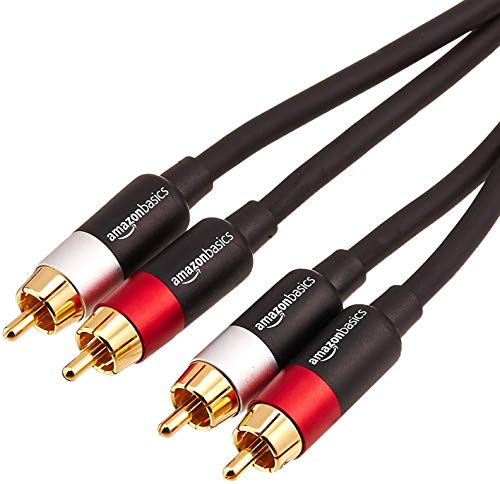
Gold-plated dual RCA cables with superior shielding reducing interference. 1.2m length ideal for turntable connections. Reliable performance.
This gauge gives 0.01g precision for the tracking force adjustment described above. Far more reliable than reading a counterweight position by eye. Two minutes with an accurate gauge is the most effective tuning step in the entire setup process.

Accurate digital gauge ensuring optimal tracking force for cartridge longevity and sound quality. LCD display with 0.01g precision. Essential tool for turntable setup.
Find Your Perfect Setup
Answer a few quick questions and get personalised recommendations.
Start the QuizFrequently Asked Questions
How do I balance the tonearm on my turntable?
First, set the anti-skate to zero and remove the stylus guard. Adjust the counterweight until the tonearm floats parallel to the platter (not touching the record). Then rotate the dial on the counterweight to zero without moving the weight itself. Finally, turn the entire counterweight to your cartridge's recommended tracking force (typically 1.5-2.5 grams).
What tracking force should I use?
Check your turntable's manual for the recommended range, typically 1.5-2.5 grams. The Audio-Technica AT-LP120X recommends 2.0 grams, while the Rega Planar 1 uses 1.75 grams. Setting it too light causes skipping and poor sound; too heavy accelerates record wear. Use a tracking force gauge ($10-20) for accuracy.
Do I need to connect my turntable to an amplifier?
It depends. If your turntable has a built-in preamp (look for a phono/line switch), you can connect directly to powered speakers. Without a built-in preamp, you need either an amplifier with a phono input, or a separate phono preamp between the turntable and speakers/amplifier.
How do I connect my turntable to Bluetooth speakers?
You need a turntable with Bluetooth output (like the Sony PS-LX310BT) or add a Bluetooth transmitter to the turntable's line output. Note that Bluetooth compresses audio quality, so wired connections always sound better. For best results, use powered speakers with a wired RCA connection.
Related Guides
Record Player Beginners Guide 2026 | Start from $250
How-ToPhono Preamp Guide 2026 | Do You Need One? From $39
Setup GuideTurntable Cartridge Upgrade Guide 2026 | From $59
Setup GuideVinyl Record Care Guide 2026 | Cleaning and Storage
Setup GuideHow to Set Up a Record Player UK 2026 | Step-by-Step
Ready to find your perfect setup?
Our quiz matches you with the right turntable, speakers, and accessories.
Take the Quiz - It's FreeNo email required