Best Turntables with USB UK 2026 | Digitise Your Vinyl

Vinyl collector for over thirty years. Found my first turntable and a box of records in the loft at twelve — Nashville Skyline, After the Gold Rush, Disraeli Gears. Still spinning on a vintage Sony PS-X600.
Just so you know, some links on this page are affiliate links. If you buy something via them, we get a small kickback. You don't pay more, but it helps toward the next record.
USB turntables let you connect directly to a computer and digitise your vinyl collection. Useful feature or marketing gimmick? Depends entirely on whether you'll use it.
Why USB Matters
USB output sends audio from the turntable to your computer as a digital signal. Software captures this as a file: MP3, FLAC, WAV, whatever you choose.
Reasons to want USB: - Digitise records unavailable on streaming services - Preserve rare or deteriorating vinyl - Listen to your vinyl collection on the go - Create backups of irreplaceable recordings - Transfer inherited collections to modern formats
If none of these apply, USB adds nothing. Skip to recommendations without USB and save money or get better sound quality for the same price.
Good USB Turntables
Audio-Technica AT-LP120XUSB: the Audio-Technica AT-LP120X with USB bolted on. Same excellent turntable, same features, same sound quality through regular outputs. The USB is just a bonus. See our LP60X vs LP120X comparison if you're deciding between the two.

Best USB turntable overall, excellent sound quality with USB digitising as a bonus
Audio-Technica AT-LP60XUSB: budget option with USB. Same as the Audio-Technica AT-LP60X with USB added. Press a button, it plays. Press record on your laptop, it captures. Simple.
Pro-Ject Debut Carbon DC: premium belt drive with USB option. Better sound quality than the Audio-Technica options, for those willing to spend more.
Sony PS-HX500: Sony's hi-res USB turntable. Records directly to DSD format for those who care about ultimate quality digitisation.
Software for Recording
Most USB turntables include basic software like Audacity (free, open-source). It works. Import audio, split tracks, export files. Functional but basic.
For better results:
Audacity (free): capable editing, noise reduction, track splitting. Learning curve but powerful.
VinylStudio: designed specifically for vinyl digitisation. Automatic track splitting, click removal, RIAA correction, metadata handling. Worth the cost if you'll digitise many records.
For Mac users, GarageBand handles basic recording. Adobe Audition has professional tools at professional prices.
The Recording Process
Connect USB cable to computer. Launch recording software. Set input source to turntable. Press record, drop the needle. Wait while the record plays. Stop recording at the end. Split into tracks, clean up if desired, export.
Recording happens in real time. A 40-minute album takes 40 minutes to digitise. No shortcuts. Plan for slow, methodical work if you have a large collection.
Quality Considerations
Digitised vinyl isn't superior to digital originals. If an album exists on streaming services or CD, that version is technically cleaner. Digitising vinyl captures the vinyl's sound, including surface noise and the analog character.
Some prefer that character. Others find it pointless to digitise something available cleaner elsewhere.
Digitisation makes most sense for: - Records not available digitally - Specific pressings you prefer over available digital versions - Personal recordings or rare releases - Sentimental collections you want portable
The Honest Assessment
Most people who buy USB turntables never use the USB. They intend to digitise their collection "someday." Someday rarely arrives. The time investment is significant.
If you're certain you'll digitise: USB adds roughly £20-40 to equivalent non-USB models. Worth it.
If you're uncertain: skip USB. Buy a better turntable or better speakers with the savings. If you later want to digitise, add an external USB phono preamp to any turntable.
Alternative: External USB Phono Preamp
A USB phono preamp connects between turntable and computer. Products like the Rega Fono Mini A2D or Art USB Phono Plus add USB capability to any turntable.
This approach lets you buy the best turntable for your budget without limiting choices to USB models. Add digitisation capability later if the need arises.
Recommendation
If USB is essential: AT-LP120XUSB gives the best balance of turntable quality and USB capability.
If USB is a nice-to-have: buy the best turntable you can afford without USB. Add an external USB preamp if you ever need to digitise.
If USB is an afterthought: skip it entirely. Put the money toward better speakers instead.
USB is a useful feature if you'll actually use it. If you're honest with yourself and won't, spend the money on a better cartridge or a decent pair of speakers, you'll hear the difference every time you play a record.
Quick Picks
| Turntable | USB? | Best For |
|---|---|---|
| AT-LP120XUSB | Yes | Best overall with USB |
| AT-LP60XUSB | Yes | Budget entry, fully automatic |
| Rega Fono Mini A2D | USB preamp | Add USB to any turntable |
The Step-by-Step Recording Process
If you decide to digitise your records, here is the complete workflow:
1. Connect the USB cable. Run a standard USB-A to USB-B cable from the turntable to your laptop or desktop. Windows will install audio drivers automatically. Mac recognises it immediately. No additional drivers needed for the AT-LP60XUSB or AT-LP120XUSB.
2. Launch Audacity. Audacity is free and handles everything you need. Select your turntable as the recording input: Edit > Preferences > Devices, or use the input dropdown in the main window. Set recording format to 24-bit / 44.1 kHz (CD quality, recommended for vinyl).
3. Set levels. Play a loud passage of the record and watch the recording level meter. Aim for peaks around -6 dB. Too high and you get digital clipping; too low and you’ll amplify noise when adjusting volume. Most USB turntables have a fixed output level, so this is more observation than adjustment.
4. Record the side. Press record in Audacity, drop the needle at the start of the record. Walk away. Come back when the side finishes. Press stop. You now have a single audio file containing the entire side.
5. Remove the lead-in. Trim the silence before the first track. Select the silent section, press Delete.
6. Split into tracks. Audacity’s Analyze > Silence Finder tool locates the gaps between tracks and adds labels. You can then export each labeled section as a separate file.
7. Apply noise reduction (optional). If the record has significant surface noise, Audacity’s Noise Reduction tool can reduce it. Get a noise profile from a silent groove section, then apply to the full recording. Use sparingly, aggressive noise reduction produces a watery artifact sound.
8. Export. File > Export > Export as FLAC (lossless, recommended for archiving) or MP3 (compressed, smaller files). Add metadata: album title, artist, track names.
Total time for a 40-minute album: 40 minutes of recording plus 15-20 minutes of editing. Faster with practice.
Software Options
Audacity (free, Windows/Mac/Linux): The standard for vinyl digitisation. Powerful, open-source, occasionally clunky interface. Does everything you need for free. Available at audacityteam.org.
VinylStudio (one-time purchase, Windows/Mac): Designed specifically for vinyl. Automated track splitting, click and pop removal, metadata lookup (queries Discogs automatically), direct export to iTunes/Music library. Worth the cost if you’re digitising more than a dozen records. Available at alpinesoft.co.uk.
GarageBand (free, Mac only): Basic but functional. Records audio input, exports files. No vinyl-specific features. Fine for occasional one-off digitisation.
Adobe Audition (£25/month, Windows/Mac): Professional audio workstation. More tools than Audacity with a better interface. Only worth it if you already have an Adobe subscription or do other audio work.
When Does Digitising Actually Make Sense?
Records that don’t exist on streaming or Bandcamp are the clearest case. Many regional pressings, private releases, obscure jazz, folk, and classical recordings from the 1960s-1980s are not available digitally. These are worth preserving.
Records where you prefer the specific pressing over the digital version. Some audiophiles maintain that original analogue-era pressings have tonal characteristics not preserved in the digital masters used for streaming. For these cases, digitising your own pressing makes sense.
Family recordings, local bands, demo tapes, and irreplaceable personal records. These have no digital equivalent. Digitise them.
The case is weaker for albums available on streaming or CD in clean remasters. The vinyl digitisation captures surface noise and the limitations of your turntable and stylus alongside the music. The streaming version was mastered from the original tapes without those additions.
Frequently Asked Questions
What file format should I record in? FLAC for archiving (lossless, about 150-200 MB per album). MP3 at 320kbps for portable listening (about 60-80 MB per album). If storage is not a concern, archive in FLAC and convert to MP3 as needed.
How do I get the best quality recording? Clean record, clean stylus, proper tracking force, and a quiet room. Surface noise is the biggest quality limiter. A clean record through an LP120XUSB will produce noticeably better recordings than a dirty record through anything. See our vinyl care guide for cleaning methods before digitising.
Can we use Garageband or iMovie to record? Yes, for basic recording. Audacity is better for vinyl because it shows you the waveform and makes track splitting easier. But any software that accepts audio input will work.
Is it legal to digitise records we own? In the UK, the Copyright, Designs and Patents Act 1988 includes a private copying exception that allows making personal copies of music you legally own for non-commercial use. Digitising your own records for personal listening is legal. Distributing the resulting files is not.
How long does a USB cable need to be? A 1.8-3 metre USB cable is sufficient for most setups. The turntable needs to be near a computer during recording, you can’t record with a turntable in one room and a computer in another. If your turntable and computer are far apart, add an external USB audio interface instead of a very long cable.
The Long Answer on USB vs External Preamp
Experienced vinyl users tend to prefer the external USB preamp approach over buying a dedicated USB turntable. The reason: you’re not limiting your turntable choice to the handful of models with built-in USB.
The Rega Fono Mini A2D or ART USB Phono Plus connect between any turntable and computer via USB. You can use a Rega Planar 1, Pro-Ject, or any turntable without built-in USB and still digitise whenever you want.
This matters because the best turntables at each price point, the Rega Planar 1, Pro-Ject Debut Carbon EVO, do not have built-in USB. If you want one of these and also want USB, the external preamp approach solves both problems.
Getting the Most from USB Recording: Tips from Experienced Digitisers
The r/vinyl community has been digitising records for years. These are the tips that consistently produce the best results.
Clean before you record. Surface noise is the single biggest quality limiter. A well-cleaned record through a budget turntable produces cleaner recordings than a dirty record through an expensive one. Use a carbon fibre brush at minimum; a proper wet cleaning kit (Pro-Ject Wash It, GrooveWasher) before digitising anything you want to archive.
Record both sides in one session. Audacity’s track labels work best when you record an entire album in one or two long files, then split. This keeps your session focused and prevents the "I’ll do the second side later" delay that leaves archives half-complete.
Use 24-bit depth even if you’re archiving to 16-bit later. The additional headroom during recording reduces clipping risk. You can dither down to 16-bit on export without audible quality loss.
Label files immediately after recording. The metadata disappears when you close Audacity without saving. Spend five minutes adding artist, album, track titles, and year before exporting. Discogs has complete metadata for virtually every album ever pressed; look up your specific pressing for accurate information.
Check your work before closing. Audition the first 30 seconds of each exported track. Confirm the levels, track names, and that the silence at the start was trimmed. Catching mistakes before closing is much easier than reopening files later.
Managing a Large Digitisation Project
A collection of 200 albums takes approximately 130 hours to digitise, about 40 minutes per album recording time, plus editing. That’s a substantial time commitment.
Strategies that make it manageable:
Prioritise ruthlessly. You don’t need to digitise everything. Identify the records that are not available digitally or that you specifically want the vinyl pressing of. Digitise those first. The rest can wait or be skipped.
Batch sessions. Pick one evening per week for digitising. Record 3-4 albums in a session. After a year, you’ll have a substantial digital archive without the project feeling overwhelming.
Set up a permanent digitising station. Having to connect and disconnect cables discourages use. A USB turntable connected permanently to a laptop or NAS (Network Attached Storage) means digitising can happen whenever you’re listening rather than requiring dedicated setup time.
Use Discogs to prioritise. Check the value of your rarest records first. A mint copy of a limited pressing may be worth £50-200 on Discogs, these are the records worth digitising for preservation, regardless of streaming availability.
Storing and Organising Your Digital Collection
Storage. FLAC files for a 200-album collection occupy approximately 30-40 GB. An external hard drive is the practical storage solution; keep at least one backup copy. Google Drive, Dropbox, or Amazon Music (with family plan’s storage) can serve as cloud backup.
Organisation. The /Artist/Album/Tracks folder structure is the music industry standard. Windows Media Player, iTunes/Music, and Roon all read this structure correctly. Keep the folder naming consistent from the start.
Software for playback. Foobar2000 (Windows, free) is the standard high-quality FLAC player. VLC plays everything. Apple’s Music app handles FLAC since macOS Monterey. Roon (£119/year) is the premium option with automatic metadata, artist information, and Discogs integration.
The goal of digitisation is to make your vinyl collection portable and resilient. The physical records remain the primary experience; the digital files are the backup and the portable copy.
The Honest Summary
USB turntables solve a real problem for a specific type of listener: someone who wants to capture vinyl that doesn’t exist digitally, or who values the ability to listen to their collection on the go.
For everyone else, USB is a feature you’ll never use. The data on this is consistent: most USB turntable buyers never record a single album. The intention is real; the time investment required is significant enough that it never happens.
Before buying a USB turntable specifically for digitising, ask yourself honestly: when would I actually do this? If the answer involves ‘this summer’ or ‘eventually,’ you should probably skip USB and buy a better turntable or better speakers with the savings.
If you have a specific collection of albums that aren’t available digitally and you want them on your phone, the USB turntable is the right tool. The AT-LP120XUSB is the best one at a reasonable price. Set aside a weekend, work through the collection methodically, and you’ll have what you want.
The alternative, an external USB phono preamp attached to a better non-USB turntable, is worth considering if you want both good sound and the occasional ability to record. The Rega Fono Mini A2D turns any turntable into a USB digitiser while letting you buy a Rega or Pro-Ject as your primary turntable.
Either way: enjoy the music. That’s what it’s all for.
When you do finally sit down and digitise that album you’ve had for twenty years, the one your parents owned, or the one you found at a car boot sale for 50p, or the limited pressing you paid £80 for, the USB connection will be there, ready, exactly when you need it. That’s its value: not daily use, but perfect availability for the moments that matter.
What You'll Need With It
Clean records before digitising, not just before playing. A click or pop that's tolerable during playback becomes a fixed artifact in the audio file that stays in your digital copy permanently. A proper clean before each recording session eliminates most of these and saves editing time later.
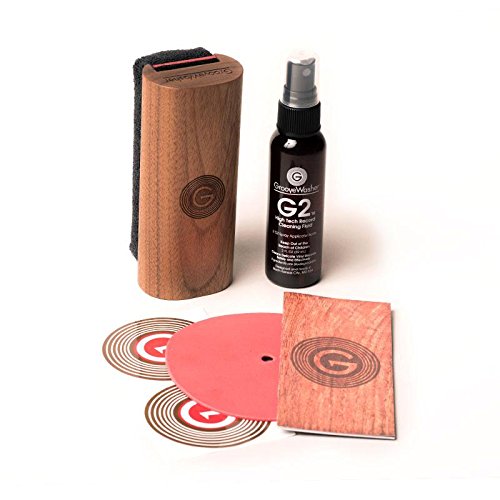
Professional cleaning system with microfibre brush, cleaning solution, and storage pouch. Safe for all vinyl types. Essential maintenance for preserving record quality.
Store records in anti-static inner sleeves between recording sessions. If you're working through a collection systematically, you'll be handling records more than usual. Anti-static sleeves prevent dust from resettling on the surface between sessions.
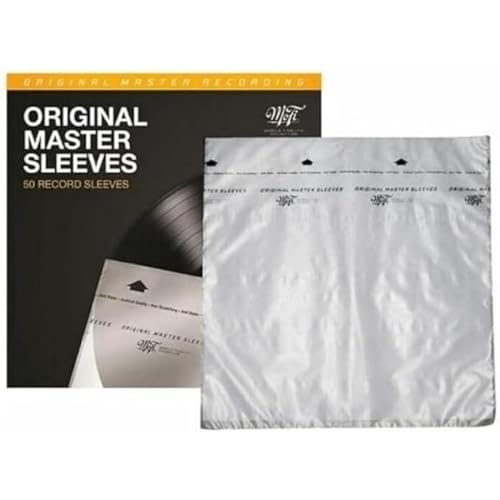
Audiophile-grade polyethylene sleeves preventing static buildup and dust accumulation. Archival quality protecting records for decades. Essential for serious collectors.
As an Amazon Associate, we earn from qualifying purchases.
Products Mentioned in This Guide
Find Your Perfect Setup
Answer a few quick questions and get personalised recommendations.
Start the QuizFrequently Asked Questions
What is a USB turntable used for?
USB turntables allow you to connect directly to your computer to digitize vinyl records into MP3, FLAC, or WAV files. This is ideal for preserving rare records, creating digital backups, or playing vinyl rips on portable devices. The USB output sends the audio signal directly to your computer for recording.
What is the best turntable with USB in the UK?
The Audio-Technica AT-LP120XUSB is the most popular option, offering excellent sound quality, direct drive, and USB output. The Audio-Technica AT-LP60XUSB is the budget choice. For higher quality, the Pro-Ject Debut Carbon DC USB adds audiophile performance with USB digitization capability.
What software do I need to digitize vinyl?
Most USB turntables include basic software like Audacity (free, open-source). For better results, use software like Adobe Audition, iZotope RX for audio restoration (removing clicks and pops), or VinylStudio which is designed specifically for vinyl digitization with automatic track splitting and RIAA correction.
Does USB affect sound quality when playing records normally?
No, the USB output is independent of the regular phono/line outputs. You can still connect the turntable to your speakers normally - the USB port is simply an additional output for computer connection. Most people use USB turntables primarily for listening, occasionally connecting them to digitize specific records.
Related Guides
Best Record Players UK 2026: Expert Picks at Every Budget
ComparisonAudio-Technica LP60X vs LP120X UK 2026 | Which to Buy
Setup GuideVinyl Record Care Guide UK 2026 | Cleaning and Storage
Buying GuideBest Turntables Under £500 UK 2026: Rega vs Pro-Ject vs Audio-Technica vs Sony
Buying GuideBest Turntables with USB 2026 | Digitize Your Vinyl
Ready to find your perfect setup?
Our quiz matches you with the right turntable, speakers, and accessories.
Take the Quiz - It's FreeNo email required